Motion graphics · AI video · How-to · Indian languages
How to Make a Motion Graphics Video with AI (Step-by-Step Guide)
Learn how to make a motion graphics video with AI: AI writes the script, voices it in 12 Indian languages, adds word-by-word captions and fills a template.
4kmotion team26 Oct 2026 5 min read

If you have searched how to make a motion graphics video with AI, you have probably found two kinds of answers: AI tools that make random video clips, and editing apps that still expect you to animate everything yourself. Neither gives you what most businesses and creators actually want, which is a clean, on-brand video with moving text, a voiceover and captions, ready for Reels and YouTube.
This step-by-step guide shows how AI can do the heavy lifting for you, what you still decide yourself, and how to get a result that looks designed, not generated.
What AI does in a motion graphics video
A motion graphics video has a few parts: the words, the voice, the captions, the design and the sound. AI can now help with every one of them:
- Script: AI writes or tightens your message to fit 15, 30 or 60 seconds.
- Voice: AI text-to-speech reads it in a natural voice, in your language.
- Timing: AI knows exactly when each word is spoken, so captions and animations land on the beat.
- Scenes: AI decides which part of your script goes on which scene of the design.
What AI should not do is invent facts, prices or claims about your business. A good tool keeps your words and your numbers, and only arranges them.
How to make a motion graphics video with AI, step by step
Here is the full process with 4kmotion, which puts all of these steps in one place.
1. Start with a topic, a link or your own script
You have three ways in:
- 1Ask the AI writer. Type a topic ("Diwali offer for my sweet shop, 20% off till Sunday") or paste a link to your product or article. The AI writes a script that fits the video length you choose.
- 2Write it yourself. Paste your own script if you already know what to say.
- 3Use your own recording. Upload a voice recording, and AI turns it into an editable transcript with timing for every word.
Tip: give the AI writer real details, like your offer, price, dates and city. The more facts you give, the less generic the script.
2. Let AI add expression to the voice
Pick a voice and language. Then use Auto-tag: AI reads your script and adds small voice directions, like a curious tone at the start or a confident tone at the end. The captions stay clean; only the voice changes. You can also add or remove tags yourself.
Twelve languages are available: English, Hindi, Tamil, Telugu, Marathi, Gujarati, Punjabi, Bengali, Odia, Assamese, Malayalam and Kannada.
3. Pick a motion template
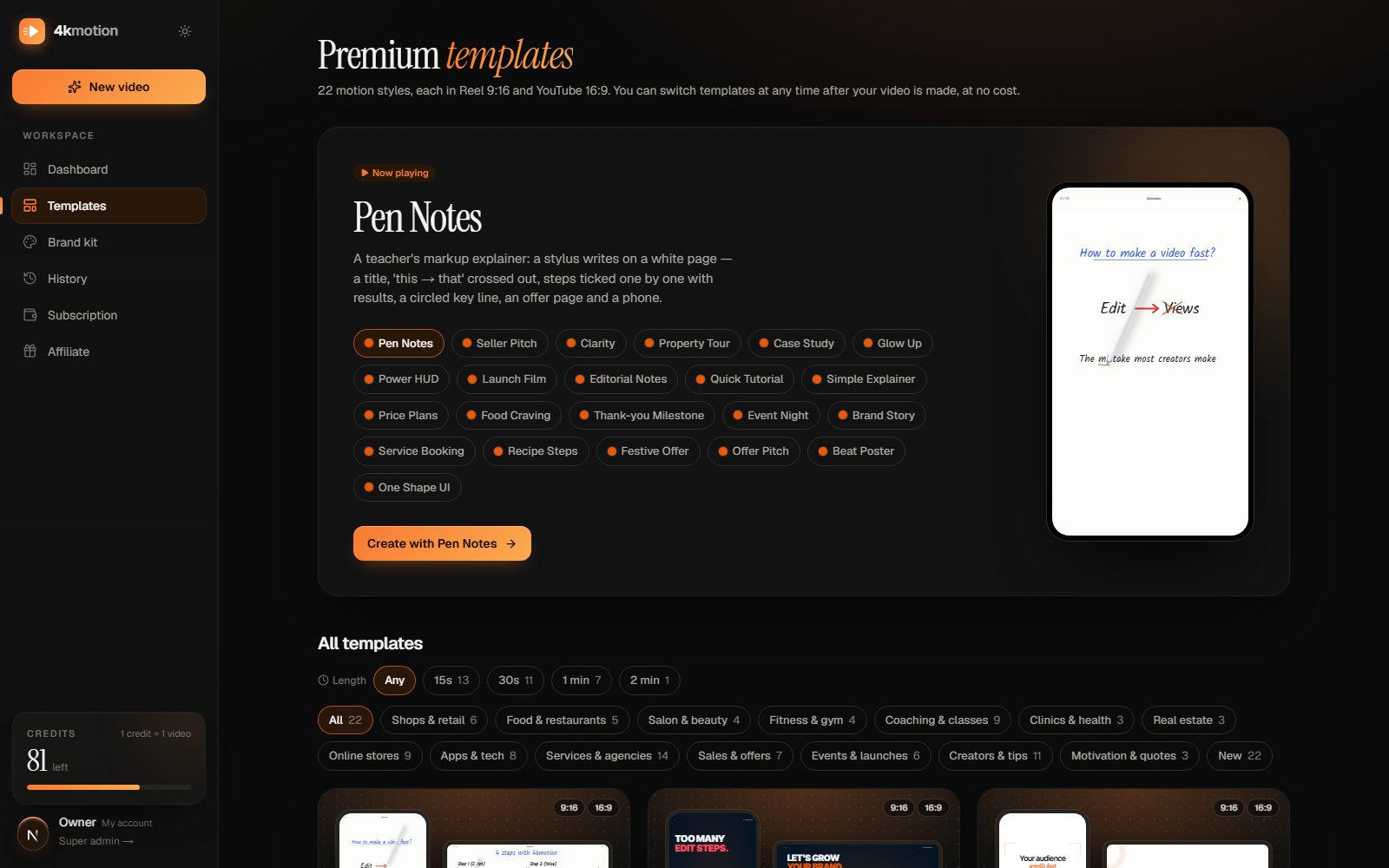
Choose from 40+ motion templates. Each template is a complete motion design with its own animation, music and sound effects, built for a purpose:
- Festive Offer for sales and festival discounts
- Property Tour for real-estate listings
- Recipe Steps for food and drink recipes
- Quick Tutorial for how-to Reels with screenshots
- Glow Up for before-and-after results
- Price Plans for comparing packages
You can filter templates by video length and by business type to find the right one quickly.
4. AI plans the scenes for your script
When you click make, AI reads your script and fills the template's scenes: the hook goes on the opening scene, each point on its own card, the price on the price scene, your call to action on the ending. It uses only what is in your script.
At the same time the voice is created, and every word gets its exact start time. That is how the captions appear word by word as the voice speaks, and why animations hit at the right moment.
5. Add your brand
Your logo and brand colours go on the video automatically if you have saved them in your Brand kit. Running more than one brand, or making videos for clients? Keep a brand kit for each and pick one per video.
6. Check, change and download
Play the preview. Want a different word on a scene, or another colour? Change it in the editor and the template re-animates with your new text. Then download:
- Reel 9:16 for Instagram Reels, YouTube Shorts and WhatsApp Status
- YouTube 16:9 for YouTube and your website
Both come from the same script, at 1080p and 60 frames per second.
AI video generators vs AI motion graphics
It helps to know the difference before you choose a tool.
AI video generators create footage from a text prompt. They are fun for visuals, but you usually cannot control the exact words on screen, your brand colours or your prices, and every attempt looks different.
AI motion graphics, the approach in this guide, start from a designed template and use AI for the script, voice, timing and scene planning. You get the same quality every time, your exact words and numbers, captions in your language, and a video you can edit later.
For marketing, tutorials and announcements, motion graphics are usually the better fit, because your message has to be correct, readable and on-brand.
Mistakes to avoid
- Long sentences. AI voices sound best with short, clear sentences.
- Too much text per scene. The captions already carry every word; on-screen text should be short.
- No clear ending. Always finish with one action: call, order, visit, follow.
- Letting AI guess facts. Put your real prices, dates and places in the script yourself.
- Wrong length. A 15-second template with a 1-minute script will repeat scenes. Pick the length first.
Frequently asked questions
Is the voice really AI, or do I need to record?
Both work. Pick an AI voice, or upload your own recording. On plans that include it, you can also clone your own voice in the Brand kit and use it like any other voice.
Can AI write the script in Tamil, Telugu or other Indian languages?
Yes. Choose the language first, and the AI writer writes the script in that language and script, and the captions follow it.
Will the video look the same as everyone else's?
The template gives the design, but your words, voice, language, brand colours and logo make it yours. With 40+ templates and new ones added regularly, there is plenty of variety.
Can I make videos without a voiceover?
Yes. Choose music-only, type your on-screen text, and the video plays with music and sound effects at a comfortable reading pace.
How do I try it?
Sign up free. You get free credits to make your first videos, with no payment needed. Plans are on the pricing section.
Try it with one real message
The best way to learn is to make one. Take a real offer or tip from your business, give it to the AI writer, pick a voice and a template, and see your first AI motion graphics video in a few minutes. Start free on 4kmotion.
Keep reading

Motion graphics · How-to
How to Make a Motion Graphics Video in Minutes (No Editing Skills)
Make a motion graphics video in minutes: write a script, pick an AI voice and a template, and download Reel and YouTube versions. No editing skills needed.
5 min read · 26 Oct 2026

Motion graphics · Small business
12 Motion Graphics Video Ideas for Small Businesses in India
12 motion graphics video ideas for small businesses: festival offers, menus, before-and-after, property tours and more, with what to say and which template.
5 min read · 26 Oct 2026

Reels · Hindi
How to Make Reels with AI Voice in Hindi (Step-by-Step Guide)
Make Reels with AI voice in Hindi in minutes: write or AI-write a script, pick a Hindi voice, get word-by-word captions and download Reel + YouTube. No editing.
6 min read · 24 Oct 2026