Motion graphics · How-to · Reels · AI voice
How to Make a Motion Graphics Video in Minutes (No Editing Skills)
Make a motion graphics video in minutes: write a script, pick an AI voice and a template, and download Reel and YouTube versions. No editing skills needed.
4kmotion team26 Oct 2026 5 min read

Want a motion graphics video in minutes, the kind with moving text, smooth transitions and a clean voiceover, without opening editing software? A few years ago that meant hiring a motion designer or spending a weekend learning After Effects. Today you can type what you want to say, pick a design and download a finished video while your tea is still hot.
This guide shows you exactly how, step by step, with 4kmotion. It also covers what makes a short motion video work, so your first one already looks professional.
What is a motion graphics video?
A motion graphics video tells a message with moving text, shapes, icons and images instead of filmed footage. Think of the Reels where each word pops in as it is spoken, a price slams onto the screen, or a checklist ticks itself off. No camera, no actors, no shoot.
Businesses and creators use them because they:
- explain an offer or an idea in 15 to 60 seconds
- work without a camera or a studio
- look polished and on-brand
- can be remade quickly when the offer changes
The hard part used to be the making. That is what changes below.
Why it used to take days
A normal motion video goes through many hands and tools:
- 1Write a script.
- 2Record a voiceover (or hire a voice artist).
- 3Design every scene and animate it in software like After Effects.
- 4Line up captions with the voice, word by word.
- 5Add music and sound effects, then balance the levels.
- 6Export one version for Reels (9:16) and another for YouTube (16:9).
Each step needs a skill. Each change ("can we update the price?") means doing several steps again. For a small business or a solo creator, that is a lot of time and money for one 30-second video.
How to make a motion graphics video in minutes
With 4kmotion, those six steps become four short ones. Here is the whole flow.
Step 1: Write your script (or let AI write it)
Type what you want to say, in a few short sentences. Not sure what to write? Use the AI writer: tell it your topic, your business or paste a link, and it writes a script that fits the video length you pick.
Good scripts for short videos are simple:
- one idea per sentence
- a hook in the first line ("Still editing Reels for hours?")
- a clear ending with what to do next ("Start free today.")
Tip: read your script out loud once. If you run out of breath, the sentence is too long for a Reel.
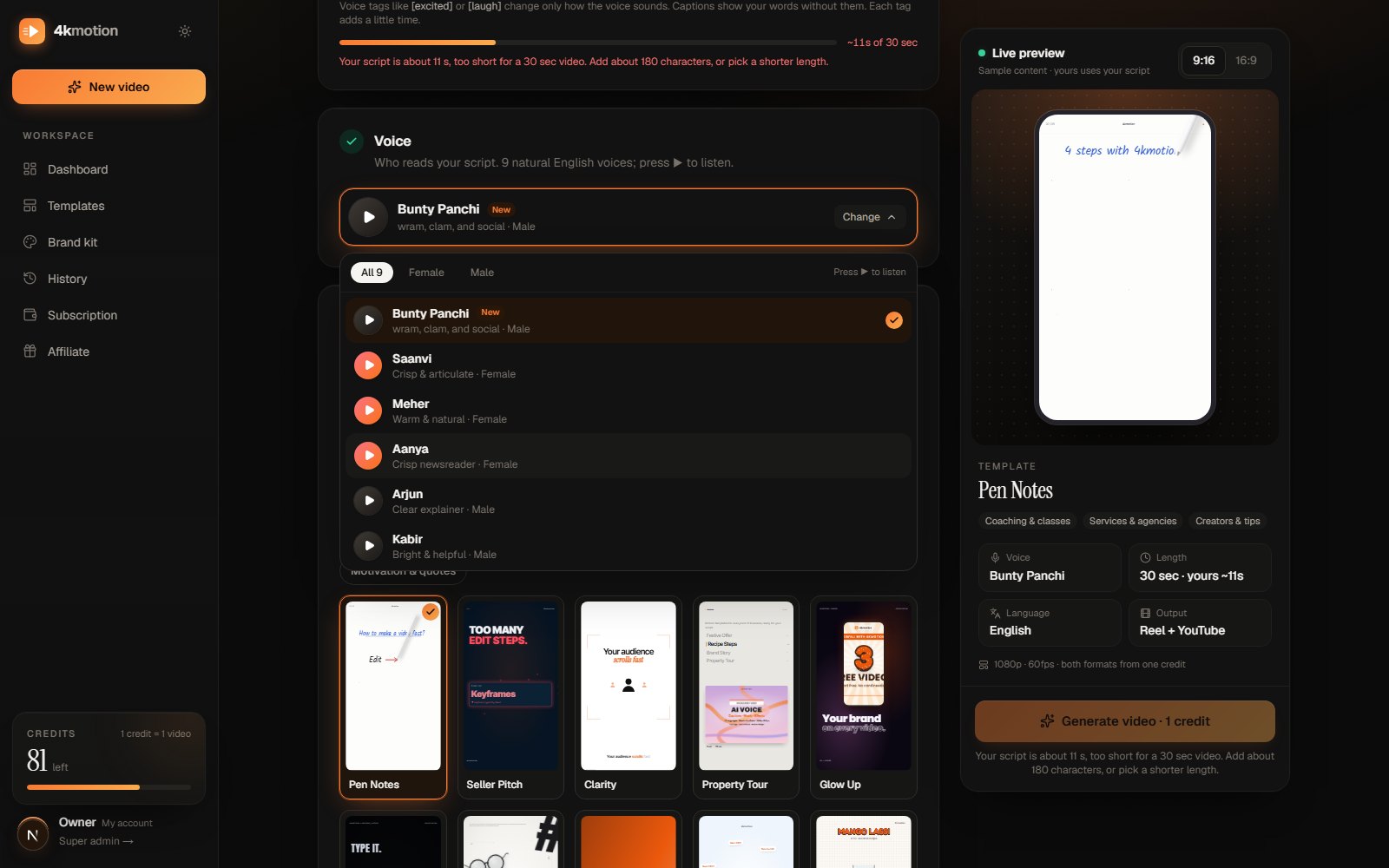
Step 2: Pick a voice and a language
Choose an AI voice, male or female, in one of 12 languages: English, Hindi, Tamil, Telugu, Marathi, Gujarati, Punjabi, Bengali, Odia, Assamese, Malayalam and Kannada. You can play a short sample of each voice before you choose.
Prefer your own voice? Upload a recording instead, and 4kmotion builds the video around it. Want no voice at all? Choose a music-only video, where the on-screen text carries the message.
Step 3: Choose a template
Pick a design from 40+ motion templates. Each one is a full motion design with its own animation, music and sound effects, not a slideshow. There are templates for offers and sales, recipes, property tours, tutorials, before-and-after results, events and more.
Templates come in lengths of 15 seconds, 30 seconds, 1 minute and 2 minutes, so pick the one that fits your script.
Step 4: Add your brand and make the video
Add your logo and brand colours (save them once in your Brand kit and every video can use them). Then click make.
4kmotion turns your script into a timed voiceover, lines up word-by-word captions in your language, fills the template's scenes with your words, and adds music and sound effects. When it's done, download both versions:
- Reel 9:16 for Instagram Reels, YouTube Shorts and WhatsApp Status
- YouTube 16:9 for YouTube, your website and presentations
Both are 1080p at 60 frames per second.
So, really "in a minute"?
Almost. Writing a short script takes a minute or two. Making the video usually takes a couple of minutes more, and downloading each format takes about a minute. Compare that with a day or two the usual way, and it feels like one.
The bigger saving is on changes. New price, new date, different language? Change the words in the editor or make a new version from the same script, instead of starting over.
Tips for a motion video people watch to the end
- Hook in the first two seconds. Start with a question or a bold promise, not your company name.
- Keep it short. For Reels, 15 to 30 seconds is plenty for one offer or one tip.
- One message per video. Three offers in one Reel means none of them land.
- Use your brand colours. People should know it's you before they read the name.
- End with one action. "Order on WhatsApp", "Book a demo", "Visit the link". Just one.
- Make it in your customers' language. A Tamil Reel for Chennai customers will feel closer to them than an English one.
Who uses quick motion videos?
- Shops and online stores: festival offers, new arrivals, price drops.
- Restaurants and cloud kitchens: menu highlights, combos, recipes.
- Coaches and teachers: tips, lessons, course launches.
- Real estate: property highlights, location, price and a contact.
- Salons, gyms and clinics: services, packages, before-and-after stories.
- Creators: how-to Reels, explainers and opinions without showing your face.
If you make content in Hindi, our guide on how to make Reels with AI voice in Hindi goes deeper into the script and voice side.
Frequently asked questions
Do I need editing skills?
No. You type the words, pick a voice and a template, and the video is put together for you. If you want, you can change the words, colours and text afterwards in the editor.
Can I use my own voice?
Yes. Upload a recording and 4kmotion times the captions and scenes to your voice. You can also clone your own voice in the Brand kit on plans that include it.
Which languages are supported?
Twelve: English, Hindi, Tamil, Telugu, Marathi, Gujarati, Punjabi, Bengali, Odia, Assamese, Malayalam and Kannada. Captions appear word by word in the same language.
Do I get both Reel and YouTube sizes?
Yes. Every video comes as Reel 9:16 and YouTube 16:9 from the same script, both 1080p 60fps.
Is there a free way to try it?
Yes. You can start free with free credits, and no payment is needed to make your first videos. See pricing for plans when you want more.
Make your first one now
Pick one offer, one tip or one announcement you want people to know about this week. Write it in three or four short sentences, and turn it into a motion graphics video in minutes. Start free on 4kmotion.
Keep reading

Reels · Hindi
How to Make Reels with AI Voice in Hindi (Step-by-Step Guide)
Make Reels with AI voice in Hindi in minutes: write or AI-write a script, pick a Hindi voice, get word-by-word captions and download Reel + YouTube. No editing.
6 min read · 24 Oct 2026

Motion graphics · AI video
How to Make a Motion Graphics Video with AI (Step-by-Step Guide)
Learn how to make a motion graphics video with AI: AI writes the script, voices it in 12 Indian languages, adds word-by-word captions and fills a template.
5 min read · 26 Oct 2026

Motion graphics · Small business
12 Motion Graphics Video Ideas for Small Businesses in India
12 motion graphics video ideas for small businesses: festival offers, menus, before-and-after, property tours and more, with what to say and which template.
5 min read · 26 Oct 2026